1. #backup path
TIME=`date +%b-%d-%y` this date format
cd /home/amit/Desktop/a/ which path where first go dir
tar -cvf backup-$TIME.tar * I am creating file tar * denote all exiting file
make tar
A
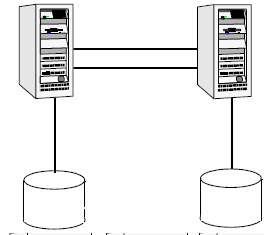
single VCS cluster consists of multiple systems connected in various
combinations to shared storage devices. VCS monitors and controls
applications running in the cluster, and restarts applications in
response to a variety of hardware or software faults. Client
applications continue operation with little or no downtime. Client
workstations receive service over the public network from
applications running on the VCS systems. VCS monitors the systems and
their services. VCS systems in the cluster communicate over a private
network.
Switchover
and Failover
A
switchover is an orderly shutdown of an application and its
supporting resources on one server and a controlled startup on
another server.
A
failover is similar to a switchover, except the ordered shutdown of
applications on the original node may not be possible, so the
services are started on another node. The process of starting the
application on the node is identical in a failover or switchover.
CLUSTER
COMPONENTS:
Resources
Resources
are hardware or software entities, such as disk groups and file
systems, network interface cards (NIC), IP addresses, and
applications. Controlling a resource means bringing it online
(starting), taking it offline (stopping), and monitoring the
resource.
Resource
Dependencies:
Resource
dependencies determine the order in which resources are brought
online or taken offline when their associated service group is
brought online or taken offline. In VCS terminology, resources are
categorized as parents
or
children.
Child resources must be online before parent resources can be brought
online, and parent resources must be taken offline before child
resources can be taken offline.
Resource
Categories:
On-Off:
VCS starts and stops On-Off resources as required. For example, VCS
imports a disk group when required, and deports it when it is no
longer needed.
On-Only:
VCS starts On-Only resources, but does not stop them. For example,
VCS requires NFS daemons to be running to export a file system. VCS
starts the daemons if required, but does not stop them if the
associated service group is taken offline.
Persistent:
These resources cannot be brought online or taken offline. For
example, a network interface card cannot be started or stopped, but
it is required to configure an IP address. VCS monitors Persistent
resources to ensure their status and operation. Failure of a
Persistent resource triggers a service group failover.
Service
Groups
A
service
group is
a logical grouping of resources and resource dependencies. It is a
management unit that controls resource sets. A single node may host
any number of service groups, each providing a discrete service to
networked clients. Each service group is monitored and managed
independently. Independent management enables a group to be failed
over automatically or manually idled for administration or
maintenance without necessarily affecting other service groups. VCS
monitors each resource in a service group and, when a failure is
detected, restarts that service group. This could mean restarting it
locally or moving it to another node and then restarting it.
Types
of Service Groups:
Fail-overService
Groups
A
failover service group runs on one system in the cluster at a time.
Parallel
Service Groups
A
parallel service group runs simultaneously on more than one system in
the cluster.
Hybrid
Service Groups
A
hybrid service group is for replicated data clusters and is a
combination of the two groups cited above. It behaves as a failover
group within
a
system zone and a parallel group across
system
zones. It cannot fail over across system zones, and a switch
operation on a hybrid group is allowed only if both systems are
within the same system zone.
The
ClusterService Group
The
Cluster Service group is a special purpose service group, which
contains resources required by VCS components. The group contains
resources for Cluster Manager (Web Console), Notification, and the
wide-area connector (WAC) process used in global clusters.
The
ClusterService group can fail over to any node despite restrictions
such as “frozen.” It is the first service group to come online
and cannot be auto disabled. The group comes online on the first node
that goes in the running state.
Agents
Agents
are VCS processes that manage resources of predefined resource types
according to commands received from the VCS engine, HAD. A system has
one agent per resource type that monitors all resources of that type;
for example, a single IP agent manages all IP resources.
When
the agent is started, it obtains the necessary configuration
information from VCS. It then periodically monitors the resources,
and updates VCS with the resource status. VCS agents are
multithreaded, meaning a single VCS agent monitors multiple resources
of the same resource type on one host. VCS monitors resources when
they are online and
offline
to ensure they are not started on systems on which they are not
supposed to run. For this reason, VCS starts the agent for any
resource configured to run on a system when the cluster is started.
If no resources of a particular type are configured, the agent is not
started.
Agent
Operation:
Online—Brings
a specific resource ONLINE from an OFFLINE state.
Offline—Takes
a resource from an ONLINE state to an OFFLINE state.
Monitor—Tests
the status of a resource to determine if the resource is online or
offline.
Clean—Cleans
up after a resource fails to come online, fails to go offline, or
fails while in an ONLINE state.
Action—Performs
actions that can be completed in a short time (typically, a few
seconds), and which are outside the scope of traditional activities
such as online and offline.
Info—Retrieves
specific information for an online resource.
Multiple
Systems
VCS
runs in a replicated state on each system in the cluster. A private
network enables the systems to share identical state information
about all resources and to recognize which systems are active, which
are joining or leaving the cluster, and which have failed. The
private network requires two communication channels to guard against
network partitions.
For
the VCS private network, two types of channels are available for
heartbeating: network connections and heartbeat regions on shared
disks. The shared disk region heartbeat channel is used for
heartbeating only, not for transmitting information as are network
channels. Each cluster configuration requires at least two channels
between systems, one of which must
be
a network connection. The remaining channels may be a combination of
network connections and heartbeat regions on shared disks. This
requirement for two channels protects your cluster against network
partitioning. Also it’s recommended to have at least one heart beat
disk region on each I/O shared between systems. E.g. two-system VCS
cluster in which sysA and sysB have two private network connections
and another connection via the heartbeat disk region on one of the
shared disks. If one of the network connections fails, two channels
remain. If both network connections fail, the condition is in
jeopardy, but connectivity remains via the heartbeat disk.
Shared
Storage
A
VCS hardware configuration typically consists of multiple systems
connected to share storage via I/O channels. Shared storage provides
multiple systems an access path to the same data, and enables VCS to
restart applications on alternate systems when a system fails.
Cluster
Control, Communications, and Membership
Cluster
communications ensure VCS is continuously aware of the status of each
system’s service groups and resources.
High-Availability
Daemon (HAD)
The
high-availability daemon, or HAD, is the main VCS daemon running on
each system. It is responsible for building the running cluster
configuration from the configuration files, distributing the
information when new nodes join the cluster, responding to operator
input, and taking corrective action when something fails. It is
typically known as the VCS engine. The engine uses agents to monitor
and manage resources. Information about resource states is collected
from the agents on the local system and forwarded to all cluster
members. HAD operates as a replicated
state machine (RSM).
This means HAD running on each node has a completely synchronized
view of the resource status on each node. The RSM is maintained
through the use of a purpose-built communications package consisting
of the protocols Low
Latency Transport (LLT)
and Group
Membership Services/Atomic Broadcast
(GAB).
Low
Latency Transport (LLT)
VCS
uses private network communications between cluster nodes for cluster
maintenance. The Low Latency Transport functions as a
high-performance, low-latency replacement for the IP stack, and is
used for all cluster communications.
Traffic
Distribution
LLT
distributes (load balances) internode communication across all
available private network links. This distribution means that all
cluster communications are evenly distributed across all private
network links (maximum eight) for performance and fault resilience.
If a link fails, traffic is redirected to the remaining links.
Heartbeat
LLT
is responsible for sending and receiving heartbeat traffic over
network links. This heartbeat is used by the Group Membership
Services function of GAB to determine cluster membership.
The
system administrator configures LLT by creating the configuration
files /etc/llthosts, which lists all the systems in the cluster, and
/etc/llttab, which describes the local system’s private network
links to the other systems in the cluster.
Group
Membership Services/Atomic Broadcast (GAB)
The
Group Membership Services/Atomic Broadcast protocol (GAB) is
responsible for cluster membership and cluster communications.
Cluster
Membership
GAB
maintains cluster membership by receiving input on the status of the
heartbeat from each node via LLT. When a system no longer receives
heartbeats from a peer, it marks the peer as DOWN and excludes the
peer from the cluster.
Cluster
Communications
GAB’s
second function is reliable cluster communications. GAB provides
guaranteed delivery of point-to-point and broadcast messages to all
nodes.
The
system administrator configures GAB driver by creating a
configuration file (/etc/gabtab).
Cluster
Topologies
Asymmetric
or Active/Passive Configuration
An
application runs on a primary, or master, server. A dedicated
redundant server is present to take over on any failure. The
redundant server is not configured to perform any other functions.
This configuration is the simplest and most reliable. The redundant
server is on stand-by with full performance capability.
Symmetric
or Active/Active Configuration
In
a symmetric configuration, each server is configured to run a
specific application or service and provide redundancy for its peer.
When a failure occurs, the surviving server hosts both application
groups.
In
the asymmetric example, the redundant server requires only as much
processor power as its peer. On failover, performance remains the
same. In the symmetric example, the redundant server requires not
only enough processor power to run the existing application, but also
enough to run the new application it takes over.
N-to-1
Configuration
An
N-to-1 configuration is based on the concept that multiple,
simultaneous server failures are unlikely; therefore, a single
redundant server can protect multiple active servers. When a server
fails, its applications move to the redundant server. In this
configuration, a dedicated, redundant server is cabled to all storage
and acts as a spare when a failure occurs.
The
problem with this design is the issue of failback.
When the original, failed server is repaired, all services normally
hosted on the server must be failed back to free the spare server and
restore redundancy to the cluster.
N
+ 1 Configuration
With
the capabilities introduced by storage area networks (SANs), you can
not only create larger clusters, but more importantly, can connect
multiple servers to the same storage. A dedicated, redundant server
is no longer required in the configuration. Instead of N-to-1
configurations, there is N+1.
In advanced N+ 1 configuration, an extra server in the cluster is
spare capacity only. When a server fails, the application service
group restarts on the spare. After the server is repaired, it becomes
the spare. This configuration eliminates the need for a second
application failure to fail back the service group to the primary
system. Any server can provide redundancy to any other server.
N-to-N
Configuration
An
N-to-N configuration refers to multiple service groups running on
multiple servers, with each service group capable of being failed
over to different servers in the cluster.
If
any node fails, each instance is started on a different node,
ensuring no single node becomes overloaded. This configuration is a
logical evolution of N + 1: it provides cluster standby
capacity instead
of a standby
server.
Storage
Configurations
Basic
Shared Storage Cluster
In
this configuration, a single cluster shares access to a storage
device, typically over a SAN. An application can only be started on a
node with access to the required storage. For example, in a
multi-node cluster, any node designated to run a specific database
instance must have access to the storage. When a node or application
fails, all data required to start on another node is stored on the
shared disk.
Share
Nothing Cluster:
There
is no storage disk. All nodes maintain separate copies of data. They
maintain separate copies of data. VCS shared nothing clusters
typically have read-only data stored locally on both systems.
Replicated
Data Cluster:
In
a replicated data cluster there is no shared disk. Instead, a data
replication product synchronizes copies of data between nodes.
Replication can take place at the application, host, and storage
levels. Regardless of which replication technology is used, the
solution must provide data access that is identical to the shared
disks. If the failover management software requires failover due to a
node or storage failure, the takeover
node
must possess an identical copy of data. This typically implies
synchronous replication. At the same time, when the original server
or storage is repaired, it must return to standby capability.
Global
Cluster
A
global cluster links clusters at separate locations and enables
wide-area failover and disaster recovery. In a global cluster, if an
application or a system fails, the application is migrated to another
system within the same cluster. If the entire cluster fails, the
application is migrated to a system in another cluster.
Configuration:
Configuring
VCS means conveying to the VCS engine the definitions of the cluster,
service groups, resources, and resource dependencies. VCS uses two
configuration files in a default configuration:
The
main.cf file defines the entire cluster.
The
types.cf file defines the resource types.
By
default, both files reside in the directory /etc/VRTSvcs/conf/config.
Additional files similar to types.cf may be present if agents have
been added, such as Oracletypes.cf.
In
a VCS cluster, the first system to be brought online reads the
configuration file and creates an internal (in-memory) representation
of the configuration. Systems brought online after the first system
derive their information from systems running in the cluster. You
must stop the cluster while you are modifying the files from the
command line. Changes made by editing the configuration files take
effect when the cluster is restarted. The node on which the changes
were made should be the first node to be brought back online.
main.cf
File
Include
Clauses
Include
clauses incorporate additional configuration files into main.cf.
These additional files typically contain type definitions, including
the types.cf file. Other type definitions must be included as
required.
Cluster
Definition
This
section of main.cf defines the attributes of the cluster, including
the cluster name and the names of the cluster users.
System
Definition
Each
system designated as part of the cluster is listed in this section of
main.cf. The names listed as system names must match the name
returned by the command uname-a. System names are preceded with the
keyword “system.” For any system to be used in a service group
definition, it must be defined in this section.
Service
Group Definition
Service
group definitions in main.cf comprise the attributes of a particular
service group.
Resource
Definition
This
section in main.cf defines each resource used in a particular service
group
Service
Group Dependency Clause
To
configure a service group dependency, place the keyword “requires”
in the service group declaration of the main.cf file. Position the
dependency clause before the resource dependency specifications and
after the resource declarations.
Resource
Dependency Clause
A
dependency between resources is indicated by the keyword “requires”
between two resource names. This indicates the second resource (the
child) must be online before the first resource (the parent) can be
brought online. Conversely, the parent must be offline before the
child can be taken offline. Also, faults of the children are
propagated to the parent.
The
following example is a basic two-node cluster exporting an NFS file
system. The systems are configured as:
1.servers:
Server1 and Server2
2.storage:
One disk group managed using VERITAS Volume Manager, shared1
3.
file
system: /home
4.IP
address: 192.168.1.3 IP_nfs1◆ public
interface: hme0◆ Server1
is primary location to start the NFS_group1
In
an NFS configuration, the resource dependencies must be configured to
bring up the IP address last. This prevents the client from accessing
the server until everything is ready, and preventing unnecessary
“Stale File Handle” errors on the clients.
include
“types.cf”
cluster
demo (
UserNames
= { admin = cDRpdxPmHpzS }
)
system
Server1
system
Server2
group
NFS_group1 (
SystemList
= { Server1, Server2 }
AutoStartList
= { Server1 }
)
DiskGroup
DG_shared1 (
DiskGroup
= shared1
)
IP
IP_nfs1 (
Device
= hme0
Address
= “192.168.1.3”
)
Mount
Mount_home (
MountPoint
= “/export/home”
BlockDevice
= “/dev/vx/dsk/shared1/home_vol”
FSType
= vxfs
FsckOpt
= “-y”
MountOpt
= rw
)
NFS
NFS_group1_16 (
Nservers
= 16
)
NIC
NIC_group1_hme0 (
Device
= hme0
NetworkType
= ether
)
Share
Share_home (
PathName
= “/export/home”
)
IP_nfs1
requires Share_home
IP_nfs1
requires NIC_group1_hme0
Mount_home
requires DG_shared1
Share_home
requires NFS_group1_16
Share_home
requires Mount_home
The
types.cf File
The
types.cf file describes standard resource types to the VCS engine;
specifically, the data required to control a specific resource.
The
following example illustrates a DiskGroup resource type definition.
The
types definition performs two important functions. First, it defines
the type of values that may be set for each attribute.
The
second critical piece of information provided by the type definition
is the ArgList attribute. The line static str ArgList[] = { xxx, yyy,
zzz } defines the order in which parameters are passed to the agents
for starting, stopping, and monitoring resources.
Attributes:
VCS
components are configured using attributes.
Attributes contain data about the cluster, systems, service groups,
resources, resource types, agent, and heartbeats if using global
clusters. For example, the value of a service group’s SystemList
attribute specifies on which systems the group is configured and the
priority of each system within the group.
Types:
String
Integer
Boolean
Introducing
the VCS User Privilege Model
Cluster
operations are enabled or restricted depending on the permissions
with which you log on to VCS. Each category is assigned specific
privileges, and some categories overlap; for example, Cluster
Administrator includes privileges for Group Administrator, which
includes privileges for Group Operator.
Cluster
Administrator
Users
in this category are assigned full privileges, including making
configuration read-write, creating and deleting groups, setting group
dependencies, adding and deleting systems, and adding, modifying, and
deleting users. All group and resource operations are allowed. Users
with Cluster Administrator privileges can also change other users’
privileges and passwords.
Users
in this category can create and delete resource types and execute
remote commands from the Manager (Java Console) via Cluster Shell.
Cluster Administrators are allowed access to Cluster Shell if
designated in the value of the attribute HaCliUserLevel.
Note
Cluster Administrators can change their own and other users’
passwords only after changing the configuration to read/write mode.
Cluster
Operator
In
this category, all cluster-, group-, and resource-level operations
are allowed, including modifying the user’s own password and
bringing service groups online.
Note
Users in this category can change their own passwords only if
configuration is in read/write mode. Cluster Administrators can
change the configuration to the read/write mode.
Users
in this category cannot create service groups or execute remote
commands via Cluster Shell. Additionally, users in this category can
be assigned Group Administrator privileges for specific service
groups.
Group
Administrator
Users
in this category can perform all service group operations on specific
groups, such as bringing groups and resources online, taking them
offline, and creating or deleting resources. Additionally, users can
establish resource dependencies and freeze or unfreeze service
groups. Note that users in this category cannot create or delete
service groups.
Group
Operator
Users
in this category can bring service groups and resources online and
take them offline. Users can also temporarily freeze or unfreeze
service groups.
Cluster
Guest
Users
in this category have read-only access, meaning they can view the
configuration, but cannot change it. They can modify their own
passwords only if the configuration is in read/write mode.
Note
By default, newly created users are assigned Cluster Guest
permissions.
Review
the following sample main.cf:
Cluster
vcs
UserNames
= { sally = Y2hJtFnqctD76, tom = pJad09NWtXHlk,betty = kjheewoiueo,
lou = T6jhjFYkie, don = gt3tgfdgttU,
intern
= EG67egdsak }
Administrators
= { tom }
Operators
= { sally }
…
)
Group
finance_server (
Administrators
= { betty }
Operators
= { lou, don }
…
)
Group
hr_application (
Administrators
= { sally }
Operators
= { lou, betty }
…
)
Group
test_server (
Administrators
= { betty }
Operators
= { intern, don }
…
)
The
following concepts apply to users executing commands from the command
line:
Users
logged on as root (or administrator) are granted privileges that
exceed those of Cluster Administrator, such as the ability to start
and stop a cluster.
When
non-root users execute haxxx
commands,
they are prompted for their VCS user name and password to
authenticate themselves. Use the halogin command to save the
authentication information so that you do not have to enter your
credentials every time you run a VCS command.
User
Privileges in Global Clusters
VCS
enforces user privileges across clusters. A cross-cluster online or
offline operation is permitted only if the user initiating the
operation has one of the following privileges:
1.
Group Administrator or Group Operator privileges for the group on the
remote cluster
2.
Cluster Administrator or Cluster Operator privileges on the remote
cluster
A
cross-cluster switch operation is permitted only if the user
initiating the operation has the following privileges:
1.
Group Administrator or Group Operator privileges for the group on
both clusters
2.
Cluster
Administrator or Cluster Operator privileges on both clusters
System
States
The
following table provides a list of VCS system states and their
descriptions.
STATE
DEFINITION
ADMIN_WAIT
The
running configuration was lost. A system transitions into this
state for the following reasons:
– The
last system in the RUNNING configuration leaves the cluster
before another system takes a snapshot of its configuration and
transitions to the RUNNING state.
– A
system in LOCAL_BUILD state tries to build the configuration from
disk and receives an unexpected error from hacf indicating the
configuration is invalid.
CURRENT_DISCOVER_WAIT
The
system has joined the cluster and its configuration file is
valid. The system is waiting for information from other systems
before it determines how to transition to another state.
CURRENT_PEER_WAIT
The
system has a valid configuration file and another system is doing
a build from disk (LOCAL_BUILD). When its peer finishes the
build, this system transitions to the state REMOTE_BUILD.
EXITING
The
system is leaving the cluster.
EXITED
The
system has left the cluster.
EXITING_FORCIBLY
A
hastop -force command has forced the system to leave the cluster.
FAULTED
The
system has left the cluster unexpectedly.
INITING
The
system has joined the cluster. This is the initial state for all
systems.
LEAVING
The
system is leaving the cluster gracefully. When the agents have
been stopped, and when the current configuration is written to
disk, the system transitions to EXITING.
LOCAL_BUILD
The
system is building the running configuration from the disk
configuration.
REMOTE_BUILD
The
system is building a running configuration that it obtained from
a peer in a RUNNING state.
STALE_ADMIN_WAIT
The
system has a stale configuration and there is no other system in
the state of RUNNING from which to retrieve a configuration.
If a system with a valid configuration is started, that system
enters the LOCAL_BUILD state. Systems in STALE_ADMIN_WAIT
transition to STALE_PEER_WAIT.
STALE_DISCOVER_WAIT
The
system has joined the cluster with a stale configuration file. It
is waiting for information from any of its peers before
determining how to transition to another state.
STALE_PEER_WAIT
The
system has a stale configuration file and another system is doing
a build from disk (LOCAL_BUILD). When its peer finishes the
build, this system transitions to the state REMOTE_BUILD.
UNKNOWN
The
system has not joined the cluster because it does not have a
system entry in the configuration.
http://www.unixarena.com/2012/07/veritas-cluster-concepts.html Thank you for reading this
article.Please leave a comment if you have any doubt ,i will get back
to you as soon as possible.
How do you troubleshoot if VCS cluster is not starting ?
How do you start VCS cluster if its not started automatically after
the server reboot? Have you ever faced such issues ? If not just see
how we can fix these kind of issues on veritas cluster. I have been
asking this questions on the Solaris interviews but most of them are
fail to impress me by saying some unrelated things with VCS stuffs. If
you know the basic of veritas cluster, it will be so easy for to
troubleshoot in real time and easy to explain on interviews too.
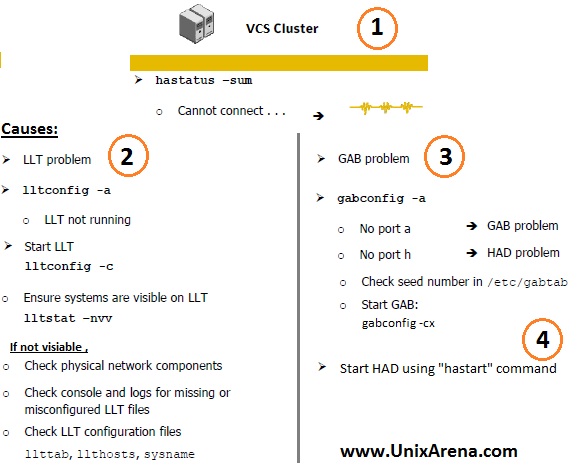
VCS troubleshootingScenario:
Two nodes are clustered with veritas cluster and you have rebooted
one of the server. Rebooted node has come up but VCS cluster was not
started (HAD daemon). You are trying to start the cluster using
“hastart” command , but its not working.How do you troubleshoot ?
Here we go.
1.Check the cluster status after the server reboot using “hastatus” command.
# hastatus -sum |head
Cannot connect to VCS engine
2.Trying to start the cluster using hastart . No Luck. ? Still getting same message like above ? Proceed with Step 3.
3.Check the llt and GAB service. If its in disable state, just enable it .
4.Check the llt(heartbeat) status. Here LLT links looks good.
[root@UA ~]# lltstat -nvv |head
LLT node information:
    Node                 State    Link  Status  Address
     0 UA2         OPEN
                                  HB1   UP      00:91:28:99:74:89
                                  HB2   UP      00:91:28:99:74:BF
   * 1 UA          OPEN
                                  HB1   UP      00:71:28:9C:2E:OF
                                  HB2   UP      00:71:28:9C:2F:9F
[root@UA ~]#
5.If the LLT is down ,then try to configure using “lltconfig -c”
command to configure the private links. Still if you have any issue with
LLT links, then need to check with network team to fix the heartbeat
links.
6.check the GAB status using “gabconfig -a” command.
[root@UA ~]# gabconfig -a
GAB Port Memberships
===============================================================
[root@UA ~]#
7.As per the above command output, memberships are not seeded. We have to seed the membership manually using gabconfig command.
[root@UA ~]# gabconfig -cx
[root@UA ~]#
8. Check the GAB status now.
[root@UA ~]# gabconfig -a
GAB Port Memberships
===============================================================
Port a gen   6d0607 membership 01
[root@UA ~]#
Above output Indicates that GAB(Port a) is online on both the nodes.
(0 , 1). To know which node is “0” and which node “1” , refer
/etc/llthosts file.
9.Try to start the cluster using hastart command.It should work now.
10.Check the Membership status using gabconfig.
[root@UA ~]# gabconfig -a
GAB Port Memberships
===============================================================
Port a gen   6d0607 membership 01
Port h gen   6d060b membership 01
[root@UA ~]#
Above output Indicates that HAD(Port h) is online on both the nodes. (0 , 1).
11.Check the cluster status using hastatus command. System should be back to business.
[root@UA ~]# hastatus -sum |head
-- SYSTEM STATE
-- System               State                Frozen
A  UA2                 RUNNING              0
A  UA                  RUNNING              0

-- GROUP STATE
-- Group           System       Probed     AutoDisabled    State
B  ClusterService  UA             Y          N             ONLINE
B  ClusterService  UA2            Y          N             OFFLINE

[root@UA ~]#
This is very small thing but many of the VCS beginners failed to fix
this start-up issues. In interviews too ,they are not able say that ,”
If the HAD is not starting using “hastart” command , I will check the
LLT & GAB services and will fix any issues with that.Then i will
start the cluster using hastart” As an interviewers , everybody will
expect this answers.
How to install new license keys for Veritas software ? Using “vxlicinst”, we can install new license keys.
#vxlicinst
Symantec License Manager vxlicinst utility version 3.02.60.007
Copyright (C) 1996-2011 Symantec Corporation. All rights reserved.

Enter your license key : XXXX-XXXX-XXXX-XXXX-XXXX-XXXX-XXXX-XXXX-X

License key successfully installed for VERITAS Cluster Server
#
3.How to remove veritas keyless licensing feature ? We can remove the keyless licensing feature using vxkeyless command.
#vxkeyless set NONE
The following changes will take effect.
  Remove: SF Standard Edition with Cluster Server
Continue (y/n)? y
node2#
4.Where the veritas license keys will be stored ? All the veritas license keys will be stored in “/etc/vx/licenses/lic”.
5.How to complete veritas licensing information ? Using “vxlicrep”,we can get all licensing information.
#vxlicrep
Symantec License Manager vxlicrep utility version 3.02.60.007
Copyright (C) 1996-2011 Symantec Corporation. All rights reserved.

Creating a report on all VERITAS products installed on this system
 -----------------***********************-----------------
   License Key                         =XXXX-XXXX-XXXX-XXXX-XXXX-XXXX-XXXX-XXXX-X
   Product Name                        = VERITAS Volume Manager
   Serial Number                       = 34876
   License Type                        = PERMANENT
   OEM ID                              = 2006
   Site License                        = YES
   Point Product                       = YES

 Features :=
   Storage Expert                      = Enabled
   VxVM                                = Enabled
   CPU Count                           = Not Restricted
   PGR                                 = Enabled
   Platform                            = un-used
   Version                             = 6.0
   Maximum number of volumes           = Not Restricted
   DMP Native Support                  = Enabled

 -----------------***********************-----------------
   License Key                         =XXXX-XXXX-XXXX-XXXX-XXXX-XXXX-XXXX-XXXX-X
   Product Name                        = VERITAS Cluster Server
   Serial Number                       = 34876
   License Type                        = PERMANENT
   OEM ID                              = 2006
   Site License                        = YES
   Point Product                       = YES

 Features :=
   Platform                            = Unused
   Version                             = 6.0
   Tier                                = Unused
   Reserved                            = 0
   Mode                                = VCS
   CPU_TIER                            = 0
#
6.To display the complete product keywords
#vxkeyless  displayall
Product                  Description
SFBASIC                  Storage Foundation Basic Edition
SFBASIC_EVAL             Storage Foundation Basic Edition (EVALUATION only)
SFSTD                    Storage Foundation Standard Edition
SFSTD_EVAL               Storage Foundation Standard Edition (EVALUATION only)
SFSTD_VR                 Storage Foundation Standard Edition with VR
SFSTD_VR_EVAL            Storage Foundation Standard Edition with VR (EVALUATION only)
SFSTD_VFR                Storage Foundation Standard Edition with VFR
SFSTD_VFR_EVAL           Storage Foundation Standard Edition with VFR (EVALUATION only)
SFENT                    Storage Foundation Enterprise Edition
SFENT_EVAL               Storage Foundation Enterprise Edition (EVALUATION only)
SFENT_VR                 Storage Foundation Enterprise Edition with VR
SFENT_VR_EVAL            Storage Foundation Enterprise Edition with VR (EVALUATION only)
SFENT_VFR                Storage Foundation Enterprise Edition with VFR
SFENT_VFR_EVAL           Storage Foundation Enterprise Edition with VFR (EVALUATION only)
VCS                      Cluster Server
VCS_EVAL                 Cluster Server (EVALUATION only)
7.To list the short summary of licensing with valid license keys.
#vxlicrep -si
Symantec License Manager vxlicrep utility version 3.02.60.007
Copyright (C) 1996-2011 Symantec Corporation. All rights reserved.

Creating a report on all VERITAS products installed on this system
   License Key                         =XXXX-XXXX-XXXX-XXXX-XXXX-XXXX-XXXX-XXXX-X
   Product Name                        = VERITAS Volume Manager
   License Type                        = PERMANENT

   License Key                         =XXXX-XXXX-XXXX-XXXX-XXXX-XXXX-XXXX-XXXX-X
   Product Name                        = VERITAS Cluster Server
   License Type                        = PERMANENT
#
8.To list the product features ,
#vxdctl license
All features are available:
 Mirroring
 Root Mirroring
 Concatenation
 Disk-spanning
 Striping
 RAID-5
 VxSmartSync
 DMP (multipath enabled)
 DMP Native Support
#
9.To check the specific features for specific license keys ,
#vxlictest -f FASTRESYNC -k XXXX-XXXX-XXXX-XXXX-XXXX-XXXX-XXXX-XXXX-X
FASTRESYNC feature is licensed
#
#vxlictest -f "Cross-platform Data Sharing" -k XXXX-XXXX-XXXX-XXXX-XXXX-XXXX-XXXX-XXXX-X
Cross-platform Data Sharing feature is licensed
#